
Yeah, this might come off as heretical, but sometimes I do enjoy playing games in front of the big TV on the comfy sofa. The only problem is that most good games are for PC now, and some genres do not support gamepads. However, with the Steam input controller anything is possible, regardless of the game having native support or not. And as it is, which is not too surprising, Xenonauts 2 does not have support for a gamepad. Here comes Steam to the rescue!
Only one problem. Nobody has made a custom layout for Xenonauts 2. So, I felt that I had to create one. It’s for everyone that wants to try defeating the aliens from the comforts of the sofa.

The layout
Now, I haven’t had the time to do any extensive testing yet. But from the ground mission I played, and from a little air dueling, it works fairly well. It takes longer to play with a controller compared to mouse & keyboard on PC, but that’s a given.
If we start with the face buttons. I concentrated everything involving ground combat there. Things you activate often. Right and left-clicking has many functions in combat and beyond on PC. And it’s no difference here. For example, the square button (right-clicking) has multiple roles. It opens doors when hovering over them, it turns characters, and it will also cycle between rates of fire when aiming at an enemy. It’s something to take into consideration. All other functions that don’t have a button short-cut will have to be activated manually by the right stick, as it has taken the role of the mouse.
If we proceed straight up on the picture, we now have the triggers, bumpers, and some menu buttons. The triggers and bumpers will work as the camera control when it comes to rotation and height level select. Then the capture button will end the turn, and options will work as the “escape” key, which will bring you to the menu.
Next, let’s check out the d-pad. The up and down key on the d-pad will zoom in and out. The left button will cycle between units, and so will the right one, with one key difference. In a move, the right d-button will also speed up the gameplay. Say, if your man has to travel far, and you don’t feel like waiting. Then we have the left stick. It controls the camera. However, if you click it, you can also manually set the rate of fire (see edit at bottom for change). The right joystick quicksaves the game, if you play outside of ironman mode.
That’s basically everything. Since there isn’t more room on the PS4 controller, most things involving the dogfighting will have you clicking on the UI with the pointer, except for the trackpad, which doubles as a pause button.
Activate
To activate gamepad support, and to test out my setting, or whatever setting you want, you will want to make sure Steam controller input is activated. Right click on Xenonauts 2 under installed games on Steam. Pick properties, then controller and activate enable steam input.
When that’s done, close that tab and right click on Xenonauts 2 once again. Pick manage, and then controller layout.
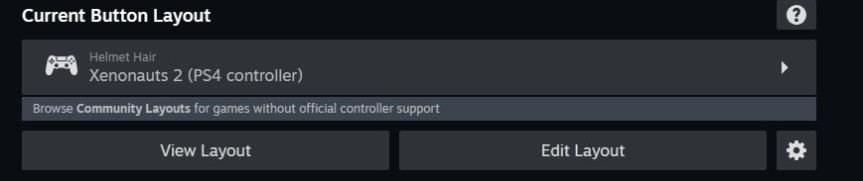
It should look like something like this. However, it won’t have my input just yet. Click on the huge tab in the middle, with the little gamepad icon.

Go to community layouts, and click on my layout [Xenonauts 2 (PS4 controller)] and then apply layout. There should be only one, as only one shows up for me currently (which is mine). Otherwise, it can be spotted through my name: Helmet Hair. If nothing else work, or it does not show up, here is the direct link: steam://controllerconfig/538030/3365023252 (you must copy & paste in your browser).
Now, you should have the config for playing pretty comfortably with a PS4 controller. It might work for an Xbox 360 controller also, but I don’t have one for testing at this moment. If you do test it, some buttons might have to be switched around, since they don’t exist on the 360 controller. If you make one, please share it with the community hub, as it could be very useful!
That’s all from me. Time for me to go back to eagerly waiting for milestone 5, so I can plant myself on the sofa with my PS4 controller.
/Thomas
Update:
I forgot about one very important button. The free-aim key, which is CTRL on the keyboard. I changed out LEFT-STICK for the CTRL key. It functioned as a bonus rate of fire cycle button before. Free-aim works by holding down the stick when you want to free-aim. The PS4 layout is called the same, but now with an added “version 3”.
 Tom's Gaming Vault